1. Customer backend
Authenticates the user, owns authorization, and exchanges the server-only wic_ credential for a short-lived identity token.
This guide documents the integration architecture between a customer application and the Guanta widget. A Rails backend supplies verified identity, while a customer-owned JavaScript adapter exchanges explicitly approved messages with the widget. The Guanta interface remains isolated inside a cross-origin iframe and does not receive general access to the customer page.
Return to the live Rails example · View the source repository
The customer page and the Guanta widget operate as separate web applications with distinct origins, codebases, responsibilities, and trust boundaries. The browser's same-origin policy prevents the Guanta iframe from reading the parent page's DOM, cookies, forms, or JavaScript state. Embedding the widget therefore does not grant Guanta general access to the customer application.
An iframe is used because it gives the widget a complete, independently deployed user interface while the browser keeps it isolated from the host application. Guanta can update the conversation UI without copying application code into the customer site, and customer CSS or JavaScript cannot accidentally alter the internal widget UI.
Authenticates the user, owns authorization, and exchanges the server-only wic_ credential for a short-lived identity token.
Selects approved page context, requires the user's click, and decides which widget events the application will handle.
Exposes the supported browser API, creates the iframe, validates messages, handles readiness, and relays bounded requests.
Owns the widget UI, initializes or resumes the conversation, and turns an accepted question into a normal user message.
The integration uses controlled message exchange rather than shared page access. The customer application explicitly selects each field and supported action. The DOM is not mirrored, synchronized, or exposed to the iframe.
The supported customer integration surface is a small, versioned JavaScript API exposed by the loader. In this example it is available through window.__CLASSIS_WIDGET_EMBEDS__[publicId] and provides methods including submitQuestion(...), onHostEvent(...), and onHostRequest(...).
The loader and iframe use the browser's window.postMessage mechanism internally. Page questions and named events use protocol 1.0; structured cart requests use protocol 1.1. Customer application code should use the loader API and should not construct protocol messages directly.
| Term | Meaning in this integration |
|---|---|
| Page adapter or bridge | Customer-owned JavaScript that reads an explicit allow-list of application state and calls the loader API. |
| Loader API | The supported methods the customer page calls: identity/reset lifecycle, submitQuestion, onHostEvent, onHostRequest, and destroy. |
| Message protocol | The versioned, validated message structures exchanged internally between the loader and its associated iframe. |
| Page context | Untrusted, informational fields attached to a question. It is not authentication, authorization, or a command. |
| Host event | A named request from a user-clicked widget action that the customer page may accept or reject. |
| Customer Rails application | Guanta |
|---|---|
| Authenticates users and owns its session | Trusts the backend's signed assertion |
| Stores passwords, SSO data, and authorization rules | Never receives passwords, hashes, or Rails cookies |
| Chooses a stable external ID and display name | Makes the trusted identity available to the configured agent |
| Creates an opaque value for each successful login | Binds conversation continuity to that exact login context |
Never accept the asserted user ID, name, or login context from browser parameters. Derive all three from authenticated backend state.
Identity, conversational context, and page actions are handled as separate flows. Each has a distinct source of truth, validation path, and security classification.
| Flow | Direction | Purpose | Trust |
|---|---|---|---|
| Identity | Customer backend → Guanta | Identify the signed-in customer and safely resume the matching conversation. | Trusted only because it is derived server-side and signed/exchanged using the server credential. |
| Question + context | Customer page → widget | Submit a user-requested question with a small snapshot of approved page state. | Always treated as untrusted conversation input, even when Rails rendered the values. |
| Host event | Widget → customer page | Ask the host application to perform one predefined presentation-level action. | A request, never authority. Customer code validates the name and decides what happens locally. |
For example, authentication_state: "authenticated" helps the assistant understand the screen, but it does not authenticate the user. Only the backend identity-token flow establishes identity. Likewise, a widget host event cannot authorize an order change: the customer application would still need its normal server-side authorization and validation for any real business operation.
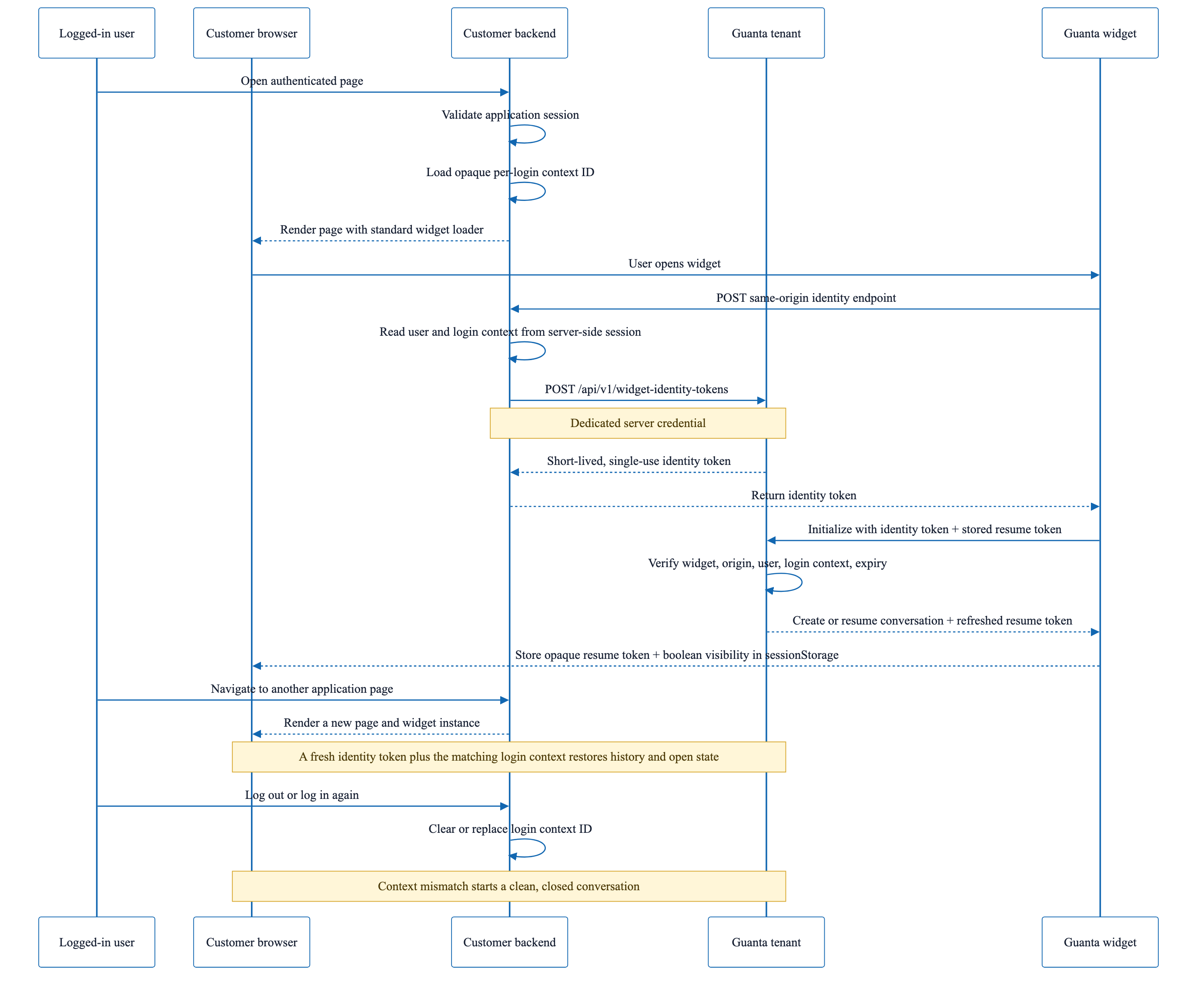
POST /widget-identity route when it initializes.Guanta::Client calls the tenant identity-token API with a server-only credential.v1.5.0.1.0 as an ordinary user message.host_event button, the iframe requests one declarative event and the customer bridge decides locally whether and how to handle it.The reference application is both an executable integration example and a manual test environment. It demonstrates anonymous and authenticated identity, conversation continuity across full-page navigation, explicit page context, user-initiated questions, a simulated application error, a controlled widget-to-page event, and a simulated Medisca cart addition.
Demonstration scope: the example users, order GT-1043, order status, and validation error are test data. The interaction patterns and security boundaries are intended for reuse; the demonstration records are not a proposed customer data model.
page: home, workflow_area: customer_home, and authentication_state: anonymous.authentication_state: authenticated.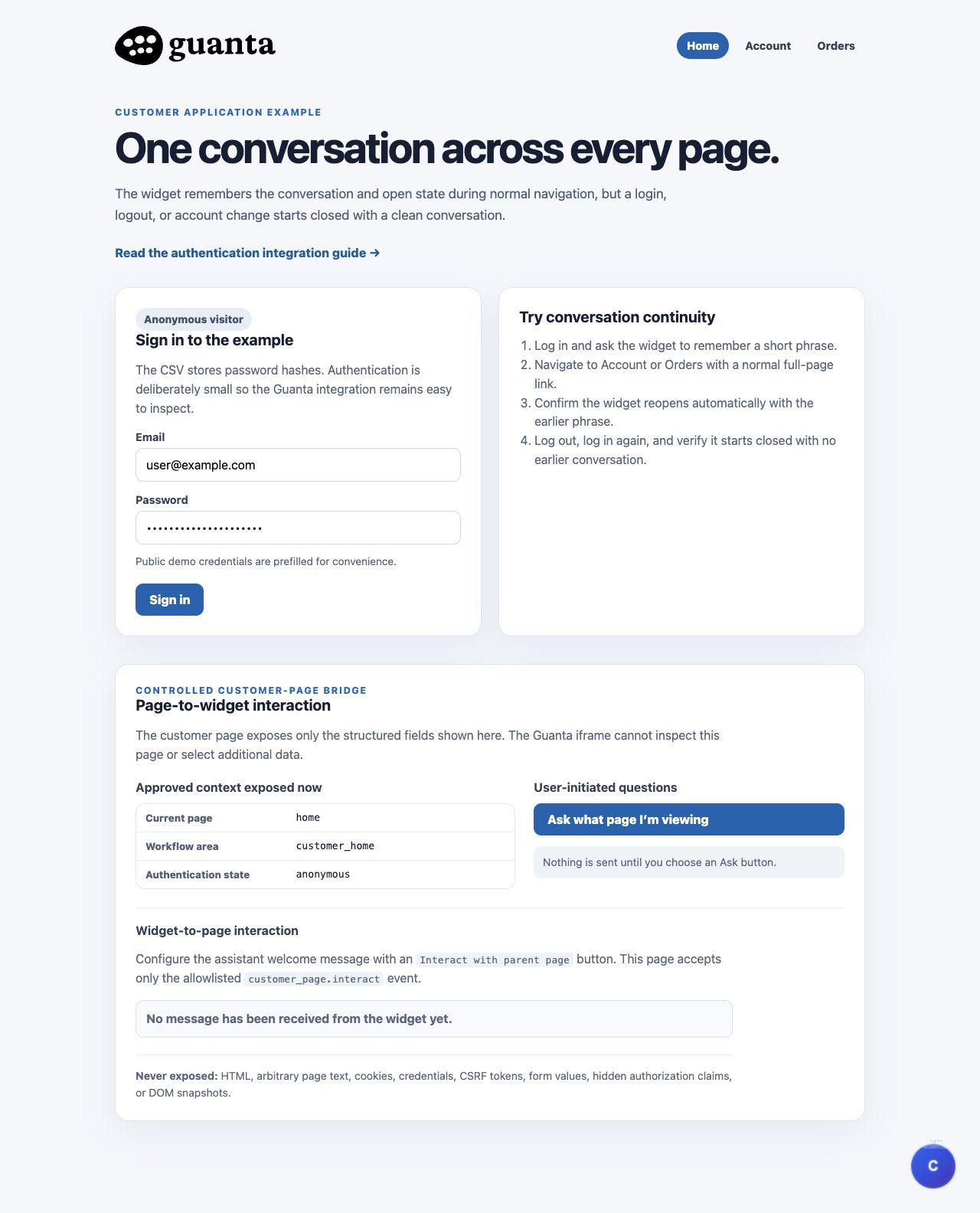
page: account and workflow_area: account_management.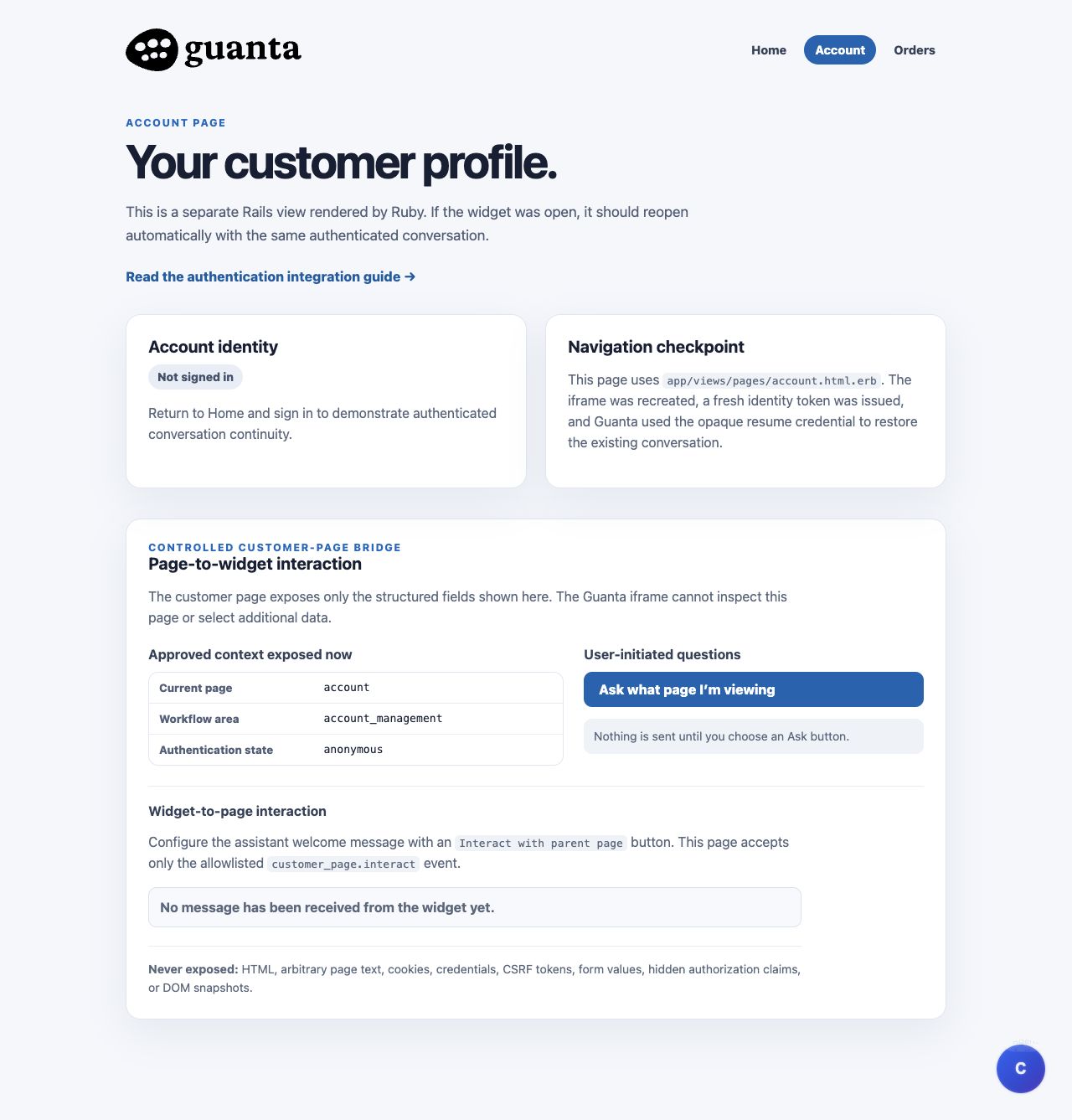
order_id: GT-1043 and order_status: in_progress.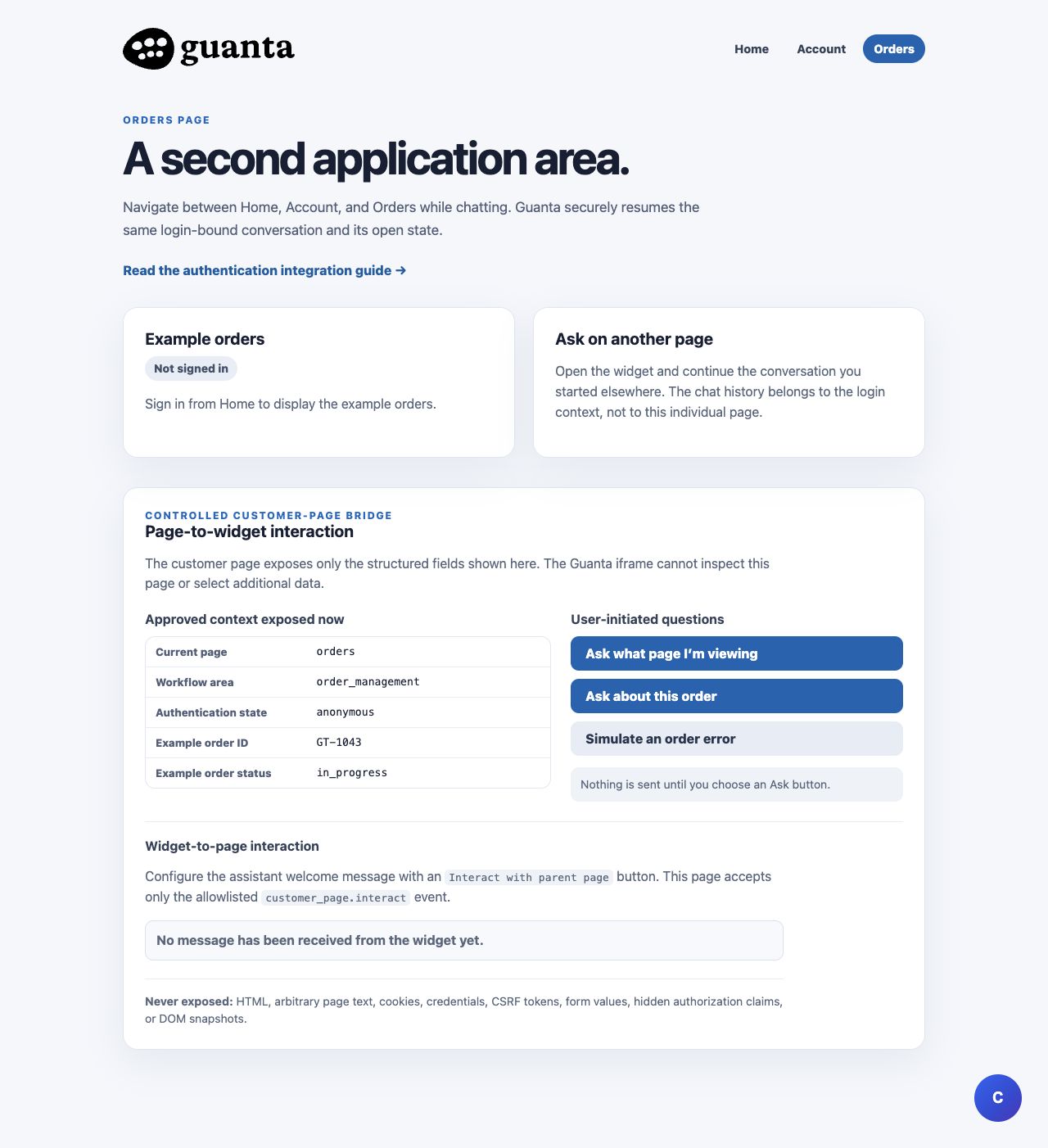
ADDRESS_VALIDATION_FAILED and the approved user-facing description.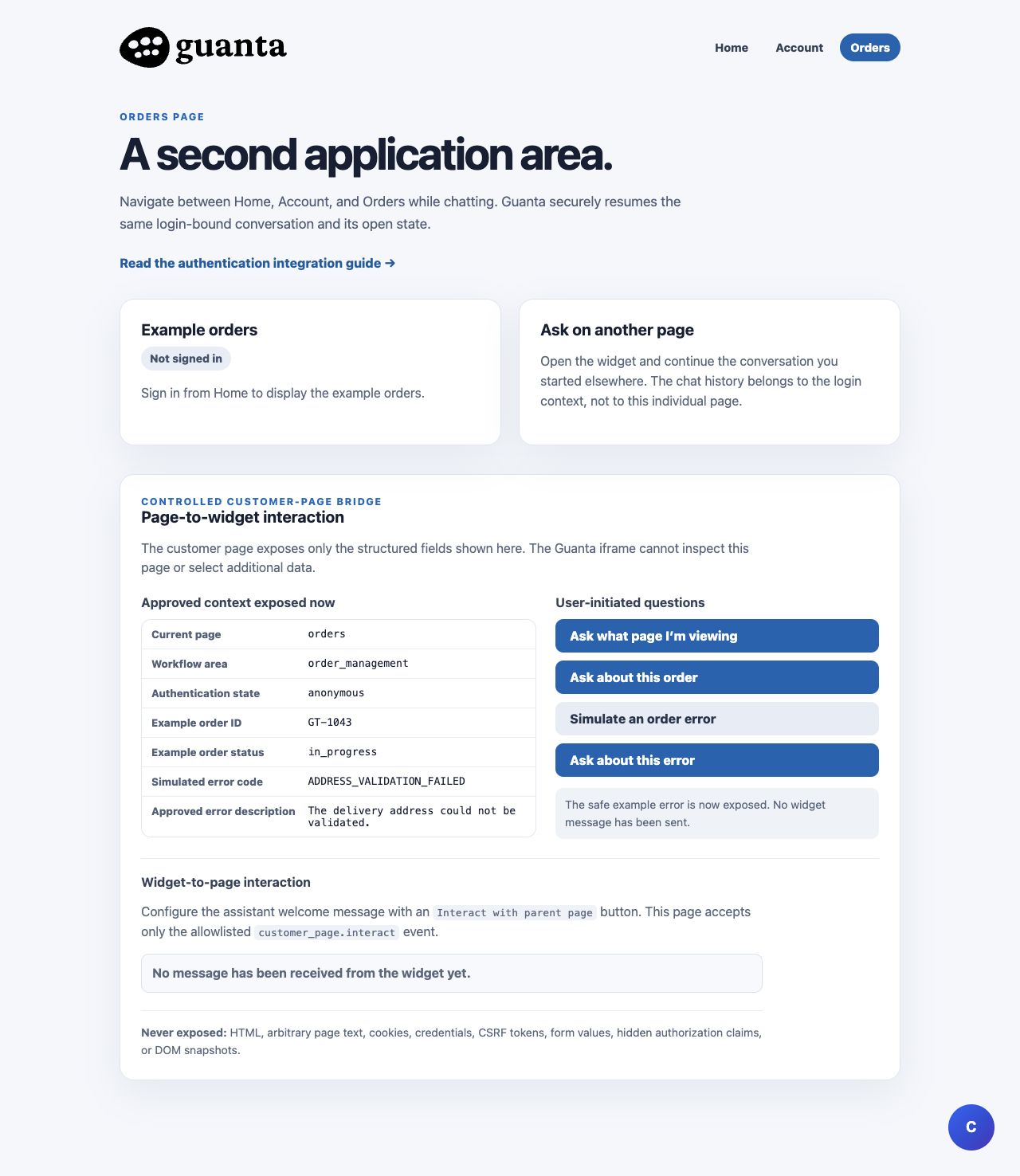
customer_page.interact event.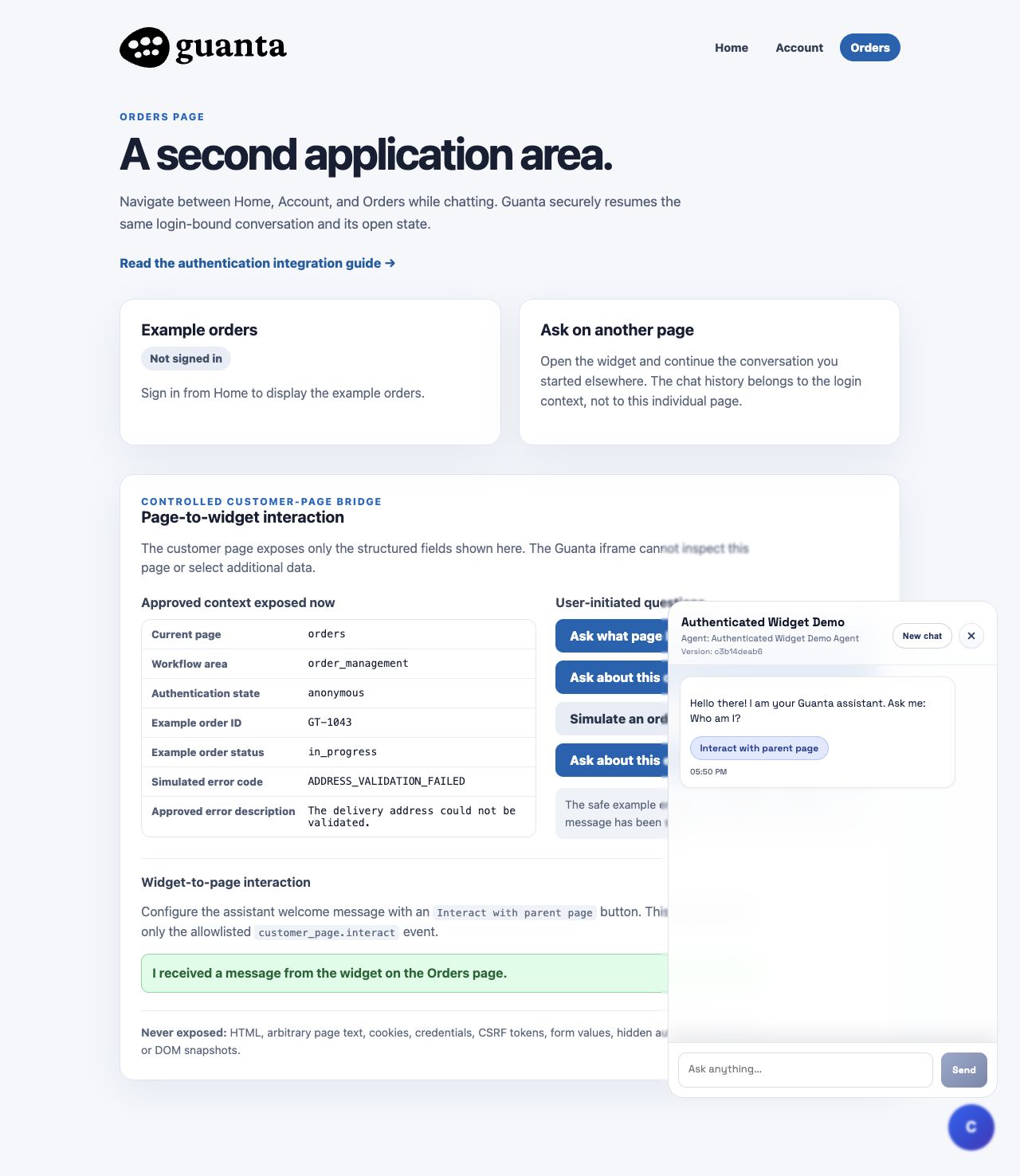
The Home page example button selects development-catalogue Capsule variant 514, SKU 3162-09, White Opaque / White Opaque, size #3, pack PK/1000. Quantity 1 means one pack. Agent-selected current physical products use the same iframe request shape. The Rails host verifies each variant through Product Library's read-only lookup, then displays separate simulated cart lines. The lookup credential stays on the server; no Medisca cart API is used.
In Mia's Initial Messages editor, choose Add catalogue variant to customer cart and enter variant ID 514 and quantity 1. The user must click the widget button. The iframe then sends a bounded cart.add_item request with only variant_id and quantity. Loader v1.5.0 validates exact origin, iframe source, protocol 1.1, key set and request ID before calling onHostRequest.
window.__CLASSIS_WIDGET_EMBEDS__[publicId].onHostRequest(async function (request) {
  if (request.name !== 'cart.add_item' || !/^[1-9][0-9]{0,11}$/.test(request.payload.variant_id)) {
    throw new Error('Unsupported cart selection');
  }
  // The host verifies the variant ID against its current catalogue before a cart mutation.
  // It supplies its own session, customer/locale/site headers and bearer.
  // Return { item_count, variant_id, quantity, sku, is_available }.
  return addVerifiedVariantToHostCart(request.payload);
});
The local host sends {"variant_id":"514","quantity":1,"public_metadata":{"algolia_query_id":"","item_list_id":"product_listing"}} to its own POST /api/medisca/v1/cart/add_item endpoint. It verifies that variant with a host-only Product Library credential before changing the simulated session cart. Agent-selected current variants use the same shape with their exact ID. A Medisca storefront host can use its own live catalogue and authenticated cart API while retaining customer, locale, site and bearer values in the host. The loader returns a bounded status for the selected line through widget_host_request_result. A successful simulated add changes the badge; it does not establish checkout availability. The observed development response for 514 reported is_available: false. The observation does not establish whether metadata is required or whether production uses the same variant IDs or badge rule.
Obtain the base URL and public widget ID from the interface Playground. Create the server credential under Widget Identity Credentials for that same interface. Add the application's exact origin to the interface's allowed origins.
APP_URL=https://customer.example
APP_SESSION_SECURE=true

GUANTA_BASE_URL=https://your-tenant.example
GUANTA_WIDGET_PUBLIC_ID=your-widget-public-id
GUANTA_WIDGET_IDENTITY_CREDENTIAL=wic_your-id.your-secret
The credential is a backend secret. Do not place it in HTML, JavaScript, Git, logs, screenshots, analytics, or browser storage.
<script
  src="/assets/embed-loader.v1.5.0.js"
  integrity="sha384-UuooHDV0euEyS/AMIqY/dgbUo4RK3ClnYUZ7t1ZfcxdtKhLdSV3aWuV93NtSX2Y7"
  crossorigin="anonymous"
  data-base-origin="https://your-tenant.example"
  data-public-id="your-widget-public-id"
  data-identity-token-url="/widget-identity"
  defer>
</script>
The actual widget UI still loads inside the Guanta-hosted cross-origin iframe. The Rails-hosted script is a byte-identical immutable copy of Classis loader v1.5.0; data-base-origin tells it where to create that iframe.
SRI (Subresource Integrity) makes the browser hash the script and refuse execution when its bytes do not match the pinned SHA-384 value. Any loader change requires a new immutable filename/version, a new SRI value, compatibility tests, and an atomic URL-and-integrity update. Earlier versioned loader assets remain unchanged.
Every customer page renders its approved context as server-owned data-* attributes, loads the small customer adapter with defer, and loads the immutable widget loader once near the end of the document. The adapter and loader are customer-hosted static files; the loader then creates the Guanta-hosted cross-origin iframe.
<head>
  <script src="/assets/guanta-page-bridge.v3.js" defer></script>
</head>

<body data-page="<%= action_name %>">
  <main>
    <%= yield %>
    <%= render "shared/page_bridge" %>
  </main>

  <%= render "shared/widget" if guanta_widget_configured? %>
</body>
The bridge partial supplies only approved state. It does not ask the adapter to crawl the document:
<section
  data-guanta-page-bridge
  data-widget-public-id="your-widget-public-id"
  data-context-page="orders"
  data-context-workflow-area="order_management"
  data-context-authentication-state="authenticated"
  data-context-order-id="GT-1043"
  data-context-order-status="in_progress">
  ...customer-owned controls and status panels...
</section>v1.5.0 creates its registry entry and the cross-origin iframe, then performs the normal identity and conversation-resume flow.onHostEvent handler. It tries immediately and again at DOMContentLoaded, covering either safe deferred-script order without polling or unrestricted global callbacks.Initial welcome messages and their buttons are copied into a conversation when that conversation is created. Refreshing resumes the existing copy. After adding or changing a welcome-message action, choose New chat to see it in a newly created conversation; rebuilding Docker is not required when the current application assets and database are already updated.
The customer-hosted guanta-page-bridge.v3.js reads only a fixed allow-list from the bridge element: page, workflow_area, authentication_state, the demonstration order_id/order_status, and—after explicit simulation—the approved error_code/error_message. The visible panel is built from the same values using textContent. The v3 bridge and cart script are served with Cache-Control: no-store so a browser loads the current adapters on each visit.
window.__CLASSIS_WIDGET_EMBEDS__[publicId].submitQuestion({
  question: "Please help me understand this simulated order error.",
  context: {
    page: "orders",
    workflow_area: "order_management",
    authentication_state: "authenticated",
    order_id: "GT-1043",
    order_status: "in_progress",
    error_code: "ADDRESS_VALIDATION_FAILED",
    error_message: "The delivery address could not be validated."
  }
});data-context-* attributes. It does not hand the loader a DOM element.submitQuestion verifies that the call has an active browser user gesture and validates the question and context before opening the widget.widget_submit_question message to that exact iframe origin and window.Simulation alone sends nothing. Submission requires a separate trusted click. The bridge disables Ask buttons while one request is pending, and the loader queues at most one question until the initialized iframe advertises readiness. A 30-second timeout or initialization/rejection error is shown on the customer page.
Delivery semantics: this implementation is intentionally at-most-once from the loader. It sends a pending request once and never retries it automatically. If acknowledgement is lost, the request times out visibly rather than risking a duplicate user message.
Protocol 1.0 uses widget_submit_question, widget_interaction_ready, and widget_question_result. Loader and iframe both require the exact expected origin, window source, version, type, keys, request ID, and payload shape. Questions are limited to 1,000 characters. Context allows at most 16 lower-snake-case scalar fields, 500 characters per string value, and 4,096 serialized characters.
Page context is untrusted informational conversation data. It is never verified identity and must never authorize application actions. The iframe cannot inspect the parent DOM, run customer JavaScript, select or mutate elements, or click anything. Do not expose raw HTML, arbitrary page text, selectors, cookies, credentials, CSRF tokens, form values, authorization claims, or DOM snapshots.
Configure an assistant welcome-message button in Guanta with the following action, or choose Interact with customer page in the Initial Messages editor:
{
  "type": "host_event",
  "label": "Interact with parent page",
  "event_name": "customer_page.interact"
}
The customer adapter registers one handler and allowlists the event name:
window.__CLASSIS_WIDGET_EMBEDS__[publicId].onHostEvent(function (event) {
  if (event.name !== "customer_page.interact") return false;
  showLocallyDefinedReceiptForCurrentPage();
  return true;
});customer_page.interact with a bounded request ID. It does not send executable code or a DOM instruction.textContent.Only the user clicking the assistant button emits the event. Protocol 1.0 uses widget_host_capabilities, widget_host_event, and widget_host_event_result. Exact origin, window source, version, type, keys, bounded request ID, and declarative event name are validated. Duplicate request IDs are suppressed.
The Rails handler accepts only customer_page.interact and derives its visible receipt from the page's own approved state, producing text such as I received a message from the widget on the Orders page. The iframe cannot supply display text, HTML, JavaScript, selectors, navigation targets, or DOM mutation instructions.
No browser integration is made safe by postMessage alone. The security comes from combining iframe isolation with a narrow API, explicit data selection, validation at both ends, and customer-controlled effects.
| Risk | Control used here |
|---|---|
| The iframe reads private application data | The cross-origin iframe cannot inspect the parent DOM. The adapter copies only named, approved scalar fields. |
| An unrelated window forges a message | The loader checks both event.origin against the configured Guanta origin and event.source against the exact iframe window. |
| A valid sender supplies an unexpected payload | Messages require the expected protocol version, source marker, type, exact key set, value types, formats, and length limits. |
| Page observation automatically talks to the agent | Questions require an active user gesture. Loading, navigation, and simulating the example error do not submit a message. |
| Fast or repeated clicks create duplicate questions | The adapter disables its buttons, the loader permits one pending question, and requests are never automatically retried. |
| The model chooses arbitrary page behavior | The widget emits only a declarative event name. Customer code uses an exact allow-list and implements the local effect itself. |
| Context is mistaken for authorization | Context is labelled and handled as untrusted conversation data. Real operations must pass through normal authenticated backend endpoints. |
| A hosted loader changes unexpectedly | The customer hosts an immutable versioned loader and pins its bytes with SRI. A changed loader receives a new filename and integrity hash. |
Origin validation is exact, not a suffix check. Trust https://playground.guanta.ai only when it exactly matches the configured origin; do not accept every origin ending in guanta.ai, and never use * as the destination for these protocol messages.
data-* attributes work well in Rails; a React, Vue, or other application may construct the same plain object from its approved application state.submitQuestion. Page load, route changes, observers, and error detection must not silently create AI messages.| Guanta supplies | The customer supplies |
|---|---|
| The immutable loader, supported JavaScript API, iframe UI, protocol validation, conversation handling, and action configuration. | The hosted loader copy and matching SRI, identity endpoint, approved context schema, click controls, host-event allow-list, local UI effects, and business authorization. |
Use this example as an architectural base, not as a reason to copy its demonstration fields into every application. The safe schema and permitted host events should be intentionally designed for each customer's real workflows.
The example isolates Guanta API behavior in app/services/guanta/client.rb and app/services/guanta/http_transport.rb. Both are independent of the demo controllers and include YARD comments for every method.
client = Guanta::Client.new(
  base_url: Rails.application.credentials.dig(:guanta, :base_url),
  widget_public_id: Rails.application.credentials.dig(:guanta, :widget_public_id),
  identity_credential: Rails.application.credentials.dig(:guanta, :identity_credential)
)

token = client.create_widget_identity_token(
  external_user_id: current_user.id.to_s,
  full_name: current_user.full_name,
  login_context_id: session.fetch(:widget_login_context_id)
)

render json: { identity_token: token.value }
The method raises Guanta::Client::ConfigurationError for invalid local values and Guanta::Client::RequestError for connectivity, rejection, or malformed-response failures.
POST /api/v1/widget-identity-tokens
Authorization: Bearer wic_credential.secret
Accept: application/json
Content-Type: application/json

{
  "widget_public_id": "your-widget-public-id",
  "external_user_id": "stable-customer-user-id",
  "full_name": "Customer User",
  "login_context_id": "opaque-per-login-value"
}external_user_id (maximum 128 characters).full_name (maximum 191 characters).login_context_id after every successful login (maximum 128 characters).The identity token is short-lived and single-use. The loader separately stores an encrypted Guanta resume token and a visibility preference in the current tab's sessionStorage. On each new Rails page it obtains a fresh identity token. Guanta resumes only when the widget, origin, user, login context, active conversation, and expiry all match.
Login and logout use reset_session. Each login receives a new SecureRandom.hex(32) context, so an old browser-held token cannot restore an earlier authenticated conversation. A new browser tab also starts closed because tab storage is separate.